
Cybersecurity for Small Businesses: A Practical Baseline That Actually Holds
A no-jargon guide to cybersecurity for small and medium businesses — where attacks really come from, the handful of controls that stop most of them, and how to build a baseline you can actually maintain.
- IT Consulting
- Cybersecurity
- Security
- Risk Management
There is a comfortable myth that cyberattacks are a big-company problem — that criminals only chase banks, hospitals, and household-name brands. The opposite is true. Smaller organizations are targeted precisely because they are smaller: fewer defenses, leaner teams, and the assumption that nobody is watching. Modern attacks are also automated, so they do not pick targets by name — they sweep the internet looking for whatever is exposed, and a small business looks exactly the same to a bot as a large one.
The good news is that you do not need an enterprise budget or a security operations center to be meaningfully safer. Most incidents that hit small and medium businesses are not exotic — they are ordinary, preventable, and stopped by a short list of basics done consistently. This guide lays out that baseline: where the real risk comes from, the controls that earn their keep first, and how to keep the whole thing maintainable instead of a one-time scramble.
Where attacks actually come from
Before spending a rupiah on tools, it helps to know what you are defending against. The headlines love sophisticated, movie-style hacking, but the reality is far more mundane. The overwhelming majority of breaches start with something simple: a person tricked into clicking, a password that was guessed or reused, or a piece of software left unpatched.
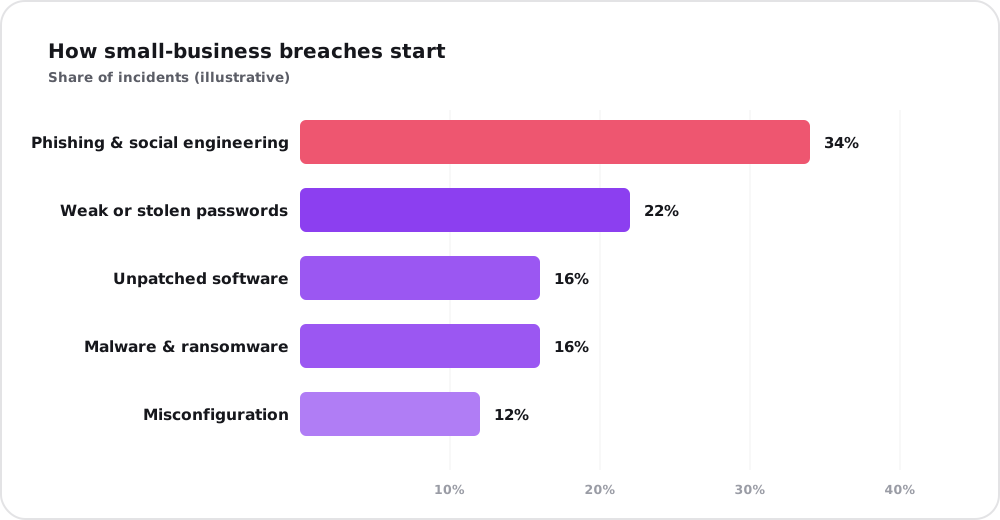
Illustrative proportions. The exact split varies by source and year, but the shape is stubbornly consistent: people and passwords — not zero-day wizardry — open most doors.
The lesson is freeing, because it tells you where to aim. If most breaches begin with phishing, weak credentials, and unpatched systems, then most of your protection comes from addressing those three — not from buying the most expensive product on the market. Security that ignores the human layer and obsesses over gadgets is defending the wrong wall.
Phishing and social engineering: your biggest exposure
Phishing is when an attacker poses as someone trustworthy — a supplier, a bank, your own CEO — to trick a person into handing over a password, approving a payment, or opening a malicious file. It works because it targets people, not code, and people are helpful, busy, and human. The newest wave makes it harder still: AI now writes flawless, personalized messages and can even clone a familiar voice on a phone call.
You cannot patch a person, but you can prepare them:
- Run short, regular awareness training — not a once-a-year video, but brief, practical reminders that show real examples relevant to your business.
- Simulate phishing occasionally so people learn in a safe setting what a real lure feels like, and so you know where the gaps are.
- Build a “pause and verify” habit for anything involving money or credentials. A payment-detail change confirmed by a quick phone call to a known number defeats most invoice fraud.
- Make reporting easy and blameless. The goal is for a worried employee to flag a suspicious email in seconds, without fear of looking foolish.
The technical baseline: a few controls that stop most attacks
Awareness handles the human layer; a small set of technical controls handles the rest. None of these are expensive, and together they close the doors attackers use most.
- Multi-factor authentication (MFA) everywhere. This is the single highest-value control you can deploy. Even if a password is stolen, MFA blocks the login. Turn it on for email, banking, and every critical system first.
- A password manager and unique passwords. Reused passwords mean one leak unlocks everything. A password manager makes strong, unique passwords effortless so people stop writing them on sticky notes.
- Patch and update promptly. Most exploited vulnerabilities already had a fix available. Turn on automatic updates for operating systems, browsers, and apps, and replace software that is no longer supported.
- Reliable, tested backups. Backups are your safety net against ransomware and honest mistakes alike. Follow the simple rule — three copies, on two kinds of media, with one kept offline or off-site — and actually test a restore, because a backup you have never restored is only a hope.
- Endpoint protection. Reputable antivirus and endpoint security on every laptop, desktop, and server catches the malware that does slip through.
- Least privilege. Give people access to only what their role needs. Day-to-day work should not run on an administrator account, so a single compromise cannot become a company-wide one.
Think in layers, not silver bullets
No single control is perfect, which is exactly why you stack several. This is defense in depth: if one layer fails — someone clicks a bad link — the next layer is there to catch it. MFA stops the stolen password from working; least privilege contains what an attacker can reach; backups undo the damage if something still gets through.
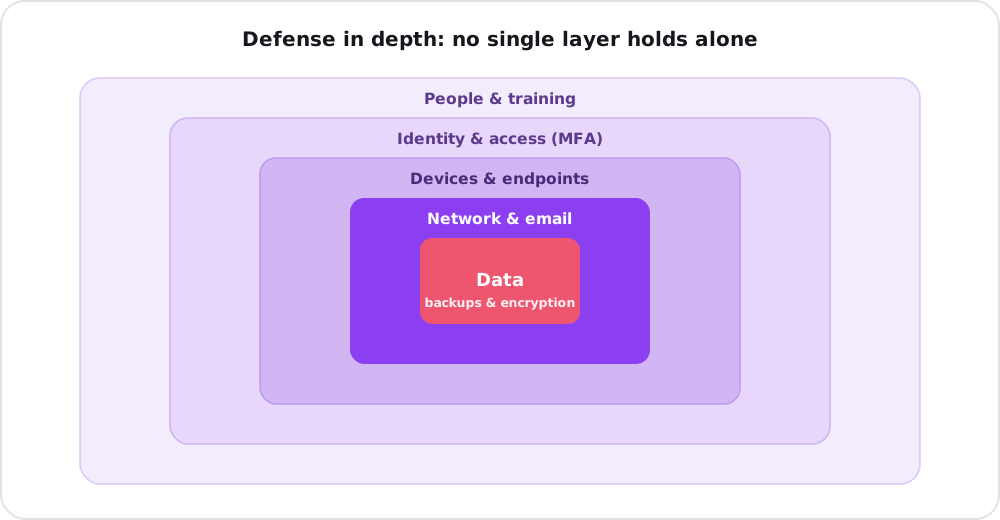
Each ring assumes the one outside it might fail. The aim is not a single perfect wall but enough overlapping layers that no one mistake is fatal — with your data, the thing you are really protecting, at the core.
This mindset matters more than any specific tool. Attackers only need one way in; you need enough layers that finding that one way still gets them nowhere useful. The same architectural thinking applies to where your systems run, too — cloud and on-premise setups each shift different parts of the security burden onto you versus a provider.
What to do first: a priority order
You do not have to do everything at once, and trying to will guarantee that nothing gets finished. Sequence it by impact versus effort, and start at the top.
| Priority | Action | Effort | Impact |
|---|---|---|---|
| 1 — Now | Turn on MFA for email, banking, admin | Low | Very high |
| 2 — Now | Set up tested, off-site backups | Medium | Very high |
| 3 — This week | Enable automatic updates everywhere | Low | High |
| 4 — This week | Roll out a password manager | Low | High |
| 5 — This month | Brief, practical phishing training | Low | High |
| 6 — This month | Apply least privilege to accounts | Medium | Medium |
| 7 — Ongoing | Review access and test restores quarterly | Medium | Medium |
The first two rows alone — MFA and tested backups — neutralize a startling share of real-world incidents. If you do nothing else this quarter, do those.
Have a plan for when something goes wrong
Even strong defenses can be breached, so part of being prepared is deciding in advance what you will do. A simple incident plan answers a few questions before the panic: Who do we call first? How do we isolate an affected machine? Where are the backups and who can restore them? How do we notify customers or regulators if data is exposed? Write it down, keep it somewhere reachable even if your systems are down, and your worst day becomes a managed event rather than a catastrophe.
Security is a habit, not a purchase
The biggest misconception about cybersecurity is that it is a product you buy once. It is closer to hygiene — a set of small, repeated habits that keep you healthy. Threats evolve, staff change, and new systems appear, so the baseline needs light, regular attention: a quarterly check that MFA is still on everywhere, that backups still restore, that nobody has lingering access they no longer need.
For a small team, that ongoing discipline is the hard part — not because it is complex, but because it competes with everyday work that always feels more urgent. This is often where outside help pays for itself: an honest review to find your real gaps and set up the baseline is far cheaper than recovering from a breach. If you are weighing whether to handle it in-house or bring someone in, our guide on when a business actually needs an IT consultant walks through that decision.
The bottom line
Cybersecurity for a small business is not about buying the most advanced tools or matching an enterprise budget. It is about doing the basics — and doing them consistently. Turn on MFA, keep tested backups, patch promptly, use a password manager, train your people to spot a lure, and limit access to what each role needs. Stack those layers, write down a simple plan for the bad day, and revisit it a few times a year. That baseline alone puts you ahead of the vast majority of targets — which, to an automated attacker scanning for the easy way in, is exactly the point.
If you would like a clear-eyed look at where your defenses actually stand — and a prioritized, no-jargon plan to close the gaps — that is precisely the kind of work our IT consulting team does. Reach out for a free consultation and we will help you build a baseline that holds.