
Disaster Recovery and Business Continuity: A Plan That Actually Works When Things Break
What disaster recovery and business continuity really mean, how RTO and RPO decide the cost of an outage, the 3-2-1 backup rule, and how to build a plan you can trust.
- IT Consulting
- Disaster Recovery
- Business Continuity
- Backups
- Risk Management

Ask most business owners when they last tested restoring a backup, and the honest answer is “never.” Backups run quietly in the background, the green checkmarks look reassuring, and everyone assumes that if the worst happens, the data will simply come back. Then a server dies, a laptop is stolen, ransomware locks every file, or someone deletes the wrong database — and the assumption gets tested for the first time at the worst possible moment.
Disaster recovery and business continuity exist so that moment is boring instead of catastrophic. They are not the same thing, they are not just “having backups,” and they are not only for big enterprises. Any business that would lose money, customers, or trust from a day of downtime needs a plan. This guide explains what these terms really mean, the two numbers that decide how much an outage costs you, and how to build a plan you can actually rely on.
Backup, disaster recovery, business continuity — three different things
These three phrases get used interchangeably, but they describe widening circles of protection. A backup is a copy of your data. Disaster recovery (DR) is the process and infrastructure that gets your systems running again after they fail. Business continuity (BC) is the wider plan that keeps the whole business functioning — people, processes, and communication — while recovery happens.
A backup with no tested restore path is just storage. Disaster recovery without a continuity plan gets the servers back but leaves staff with no idea what to do in the meantime. The three build on each other.
| Layer | What it protects | Question it answers | Example |
|---|---|---|---|
| Backup | Your data | Can we get the data back? | A nightly encrypted copy stored off-site |
| Disaster recovery (DR) | Your systems | Can we get the systems running again — fast? | Failing over to a standby server or region |
| Business continuity (BC) | The whole business | Can we keep operating while we recover? | Staff know their roles; customers get an update |
The mistake most organizations make is stopping at the first row. They buy backup software, tick the box, and never plan for the moment the data actually has to come back — under pressure, at speed, with real money leaking away every hour.
The two numbers that decide everything: RTO and RPO
Every disaster recovery conversation eventually reduces to two targets, and once you understand them the rest of the plan almost writes itself.
RTO — Recovery Time Objective is the maximum time a system can be down before the damage becomes unacceptable. It answers “how long can we be offline?” RPO — Recovery Point Objective is the maximum amount of data you can afford to lose, measured as a window of time. It answers “how much recent work can we afford to throw away?”
The clearest way to see them is to put an outage on a single timeline. The gap before the incident — from your last good backup to the moment things broke — is data you lose, and that is your RPO. The gap after the incident — from the failure until you are running again — is time you are down, and that is your RTO.
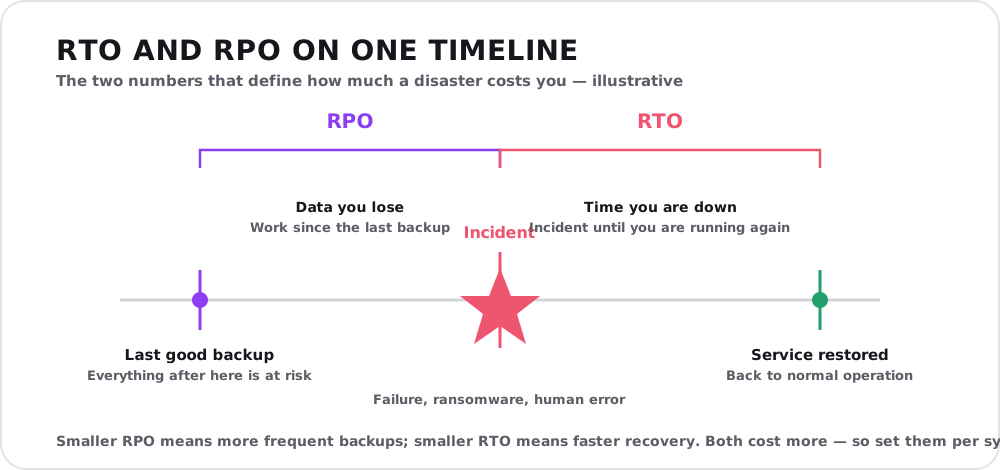
RPO is set by how often you back up; RTO is set by how fast you can recover. Pushing either toward zero costs more, so you set them per system rather than once for everything.
An RPO of 24 hours means nightly backups are enough — you accept losing up to a day of data. An RPO of five minutes means you need near-continuous replication. An RTO of one week is fine for an internal wiki; an RTO of fifteen minutes is what an online store needs before lost sales and reputation damage pile up. The tighter the target, the more the infrastructure costs — which is exactly why you should not apply the same target to everything.
Tier your systems — not everything deserves the same protection
Trying to give every system a fifteen-minute RTO is how disaster recovery budgets explode. The smarter approach is to sort systems into tiers by how much the business actually depends on them, and match the recovery target — and the spending — to each tier.
| Tier | Example systems | Typical RTO | Typical RPO | Approach |
|---|---|---|---|---|
| Mission-critical | Payments, core app, order system | Minutes | Near-zero | Hot standby / real-time replication |
| Important | Email, CRM, internal dashboards | A few hours | 1–4 hours | Warm standby, frequent backups |
| Standard | Reporting, wikis, dev tooling | 1–2 days | 24 hours | Nightly backup, restore on demand |
| Low priority | Archives, old project files | A week+ | 24 hours+ | Cheap cold storage |
This exercise forces a useful conversation with the business: which systems, if they went down right now, would cost us money or customers within the hour? Those get the expensive treatment. Everything else can recover more slowly and cheaply. Done well, tiering often lowers the total bill while improving protection where it matters.
Backups done properly: the 3-2-1 rule
Disaster recovery is only as good as the backups underneath it, and most backup failures come from a handful of avoidable mistakes: a single copy, stored in the same place as the original, never tested, and reachable by the same ransomware that encrypts everything else.
The durable answer is the 3-2-1 rule: keep 3 copies of your data, on 2 different types of media, with 1 copy off-site. A modern extension adds 1 copy that is immutable (cannot be altered or deleted once written) and 0 errors verified by an actual restore test — because attackers now deliberately target backup systems first. Alongside the rule, four habits separate real protection from theatre:
- Off-site and offline. A backup in the same building as the server dies in the same fire, flood, or break-in. At least one copy should be geographically separate, and ideally one should be immutable so ransomware cannot reach it.
- Encrypted. Backups contain your most sensitive data in one convenient bundle. Encrypt them at rest and in transit — this connects directly to your broader cybersecurity baseline.
- Automated and monitored. A backup that depends on someone remembering will be missing exactly when you need it. Automate it, and alert loudly when a run fails.
- Tested. The only backup that counts is one you have restored. Schedule real restore drills — a backup you have never restored is a hypothesis, not a safeguard.
Where things really run matters
Your recovery options are shaped by where your systems live. Cloud platforms make some of this dramatically easier — snapshots, cross-region replication, and standby environments you can spin up on demand turn what used to be a warehouse of spare hardware into a few lines of configuration. On-premise systems give you more control but put the full weight of redundancy, off-site copies, and failover on your own team. This is one more dimension of the cloud versus on-premise decision, and a hybrid setup — critical data replicated to the cloud even when the primary system runs on your own hardware — is often the pragmatic middle ground for resilience.
Business continuity: keeping the lights on around the recovery
Recovering the technology is only half the job. While systems are down, the business still has customers to reassure, staff who need to know what to do, and manual workarounds to fall back on. That is the continuity half of the plan, and it is mostly about people and communication, not servers.
A workable business continuity plan writes down, in advance:
- Who does what. A named incident lead, who declares an emergency, and who is on the recovery team — with backups for when someone is unreachable.
- How you communicate. How staff, customers, and suppliers are told what is happening and when to expect updates — using channels that still work when your main systems are down.
- Manual fallbacks. How the business keeps taking orders or serving customers on paper or a secondary tool while the primary system is offline.
- The contact sheet. Vendors, ISP, hosting provider, insurer — with numbers that are accessible when the network is not.
The step most people skip: testing
A disaster recovery plan that has never been tested is a document, not a capability. Testing is where you discover that the backup was missing a critical database, the failover takes three hours instead of thirty minutes, or the one person who knows the restore process has left the company.
Test at least twice a year, and after any significant change to your systems, team, or vendors. Start small with a paper walkthrough, then progress to actually restoring a system into an isolated environment and timing it against your RTO. Every test surfaces a gap you would far rather find on a quiet Tuesday than during a real outage. Write down what broke, fix it, and test again.
Build the plan before you need it
Disaster recovery and business continuity are not products you buy; they are decisions you make in advance about what your business can and cannot survive losing. Start by listing your critical systems and the honest cost of each being down for an hour, a day, a week. Set an RTO and RPO for each. Fix your backups to the 3-2-1 rule and prove they restore. Write down who does what while recovery happens. Then test the whole thing on a calendar, not a crisis.
None of this requires an enterprise budget — it requires the discipline to plan for a bad day before it arrives. If you would like help sizing your recovery targets, hardening your backups, or writing a continuity plan that fits your business rather than a template, that is exactly the kind of work our IT consulting team does — and often the same conversation about whether you need outside help starts here. Reach out for a free consultation, and let’s make your next bad day boring.