
System Integration: Why Your Business Apps Need to Talk to Each Other
Disconnected business apps quietly drain time and erode trust in your data. A practical guide to system integration — what it is, how APIs connect your tools, the ways to wire them together, and how to choose.
- Software Development
- System Integration
- API
- Automation

Look at how work actually moves through most growing companies and you will find a person as the integration layer. An order lands in the e-commerce platform; someone retypes it into the accounting system. A lead fills out a form; someone copies it into the CRM. Finance exports a spreadsheet from one tool and pastes it into another to build the monthly report. Each of these tools was bought to save time — and yet the seams between them quietly give a lot of it back.
This is the reality of application sprawl. Modern businesses run on dozens of specialised apps, and the number keeps climbing every year. Each one is excellent at its own job and oblivious to the others. System integration is the discipline of making those separate tools behave like one coherent system — so data flows between them automatically instead of being carried across by hand.
What system integration actually means
Integration means connecting two or more software systems so they can share data and trigger actions without a human in the middle. When a new customer is created in your CRM, an integrated stack automatically opens their record in billing, adds them to the right email list, and provisions their account — no copy-paste, no delay, no transcription error.
The goal is not “everything in one giant app.” That rarely exists and rarely fits. The goal is a single source of truth for each kind of data, with the systems that need it kept in sync automatically. Your customer list lives in one place and every other tool reads from it. Your inventory count is authoritative in one system and the storefront, the warehouse app, and the accounting ledger all reflect it in near real time.
Done well, integration is invisible. Nobody notices the plumbing — they just notice that the numbers agree, the reports build themselves, and the team spends its day on work that actually needs a human.
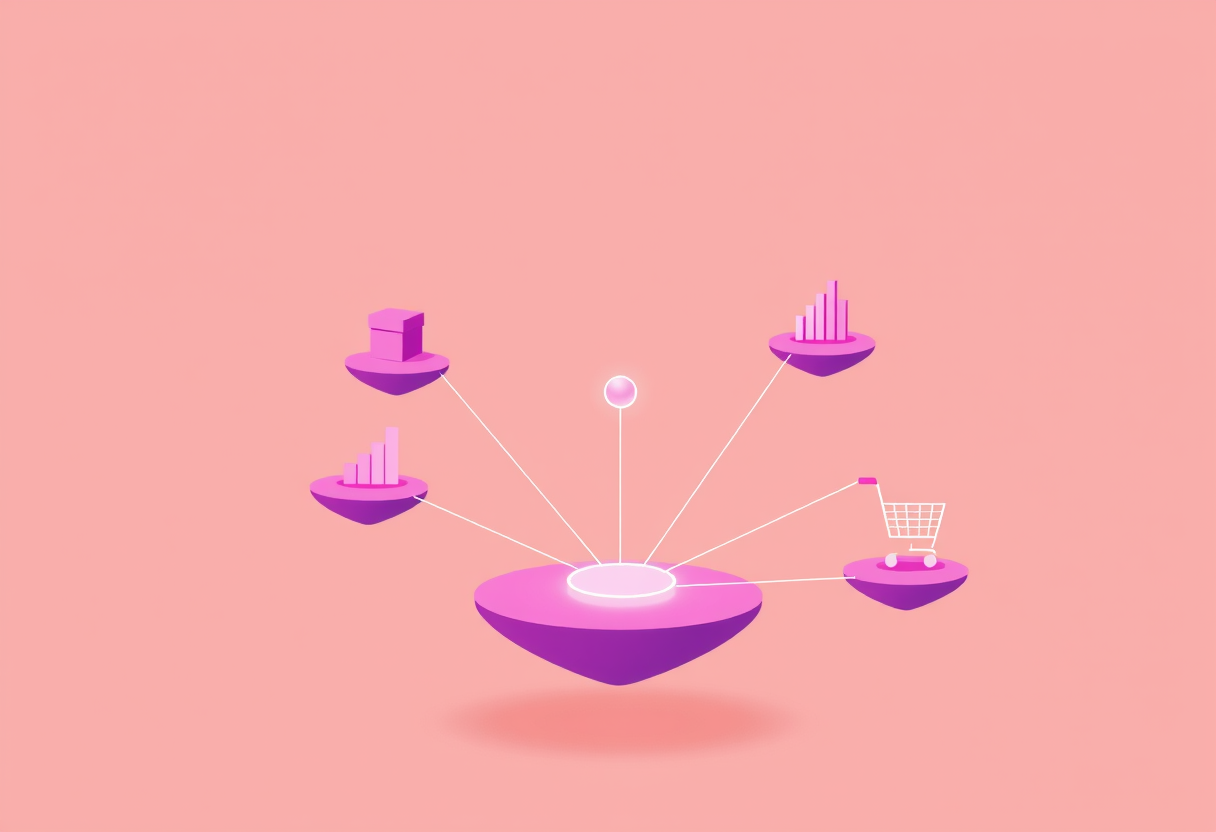
Integration turns a scatter of separate tools into one connected system, each still doing its own job.
The quiet cost of leaving systems disconnected
Disconnected tools rarely fail loudly. They fail slowly, in ways that are easy to normalise until you add them up:
- Manual re-entry. Hours every week spent moving the same data between systems by hand — time that scales with your growth, in the wrong direction.
- Data that disagrees. When the same fact lives in three places, the three places drift apart. Which revenue number is right? Nobody is quite sure, so every report starts with a reconciliation.
- Transcription errors. Every manual hop is a chance to fat-finger a figure. A wrong price or a mistyped quantity can be expensive and hard to trace.
- Slow, stale information. Decisions wait on someone to run the export. By the time the dashboard updates, the moment to act has often passed.
- Frustrated people. Skilled staff spend their day as human copy machines instead of doing the work you actually hired them for.
Industry surveys put real weight behind this: a large share of the typical IT budget goes not to building new capability but to wrestling with the complexity of unintegrated applications. The cost is paid whether or not it ever appears as a line item — it just hides inside slower months and quieter mistakes.
APIs: the language your systems speak
The mechanism that makes integration possible is the API — an Application Programming Interface. An API is simply a defined, structured way for one system to ask another for data or to tell it to do something, without either side needing to know how the other works internally.
A useful analogy is a restaurant. You (one system) do not walk into the kitchen and cook; you give your order to a waiter (the API) using the menu’s defined language, and the kitchen (the other system) sends back exactly what you asked for. The menu is the contract: as long as both sides honour it, the kitchen can change everything about how it cooks and you never have to care.
Almost every serious business tool today — your CRM, your accounting software, your e-commerce platform, your payment processor — exposes an API for exactly this reason. Integration is the work of connecting those APIs so the right data moves between them on the right trigger, safely and reliably.
Three ways to wire your systems together
Once you decide to connect things, there is more than one architecture to do it, and the choice matters as your stack grows.
| Approach | How it works | Best for | Watch out for |
|---|---|---|---|
| Point-to-point | Each system wired directly to each other system | Two or three tools, simple needs | Explodes in complexity as you add systems |
| Hub / iPaaS | All systems connect through a central integration layer | A growing stack of many SaaS tools | A platform to run, learn, and pay for |
| Event-driven | Systems publish “events” others subscribe to | Real-time, high-volume, decoupled flows | More engineering; overkill for small setups |
Point-to-point is the natural first move: you need the store to talk to accounting, so you build one connection between them. It works — until you have six systems and someone asks why a change in one place quietly broke three others.
Hub-and-spoke, often delivered as an iPaaS (Integration Platform as a Service), puts a central layer in the middle. Every system connects once, to the hub, and the hub routes data between them. Add a new tool and you make one new connection, not a dozen. This is where most growing businesses should aim.
Event-driven integration is the most flexible and the most demanding: systems announce that something happened (“order placed”, “payment received”) and any other system can react. It shines for real-time, high-volume workflows, but it is more than most small teams need on day one.
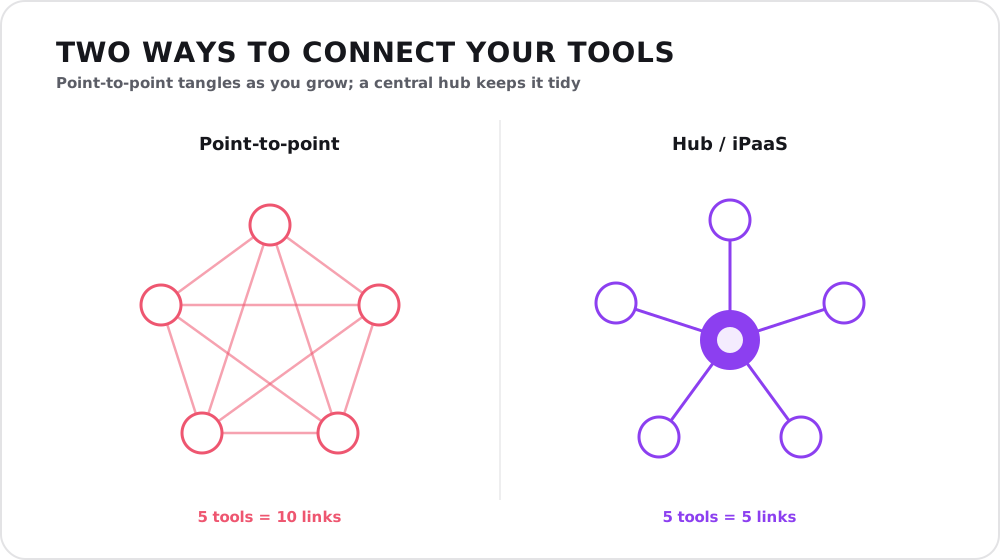
The same five tools: wired directly to each other they need ten links; routed through a hub, only five.
Why point-to-point quietly stops scaling
The reason point-to-point breaks down is mathematical, not a matter of opinion. Wire every system directly to every other one and the number of connections grows far faster than the number of systems: three tools need three links, but ten tools need forty-five. Each link is code someone has to build, test, monitor, and fix when an API changes on either end.
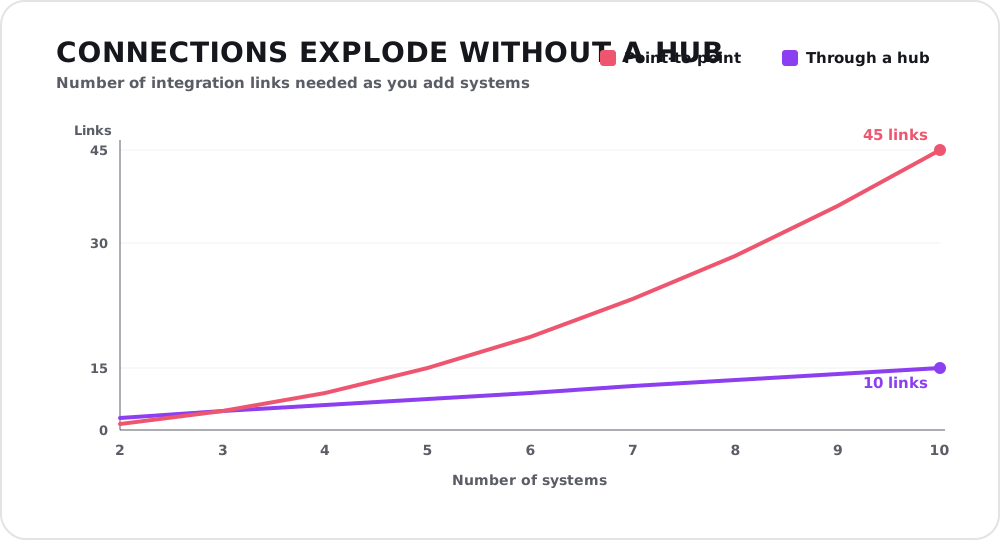
Point-to-point links grow with the square of the number of systems; a hub keeps the count linear. That gap is the whole case for an integration layer.
A central hub flips that curve. Each system connects once to the middle, so ten tools need ten connections, not forty-five. That is the whole argument for an integration layer in one picture: it keeps the cost of adding the next tool roughly constant instead of compounding. This is also why unmanaged point-to-point connections are a classic source of technical debt — each shortcut is cheap to add and expensive to live with.
Build, buy, or connect: choosing an approach
You do not have to write everything from scratch. The realistic options, roughly in order of effort:
- No-code / iPaaS connectors — for common tools with standard needs, a ready-made connector may cover you in an afternoon. Cheapest and fastest when it fits.
- Custom API integration — when a workflow is specific to how you work, or a system has no off-the-shelf connector, purpose-built integration gives you exactly the behaviour you need, with full control over the logic and error handling.
- A hybrid — a platform for the standard connections and custom code for the few that carry your real competitive logic. This is where most mature stacks land.
The right call depends on how unusual your process is, how much volume flows through the connection, and how much it costs you when it silently breaks at 2 a.m. A short conversation with an IT consultant before you commit usually pays for itself — the expensive mistakes here are architectural, not technical.
What good integration looks like
Beyond simply moving data, integration done properly has a few hallmarks worth insisting on:
- A single source of truth for each data type, with everything else syncing from it rather than holding its own rival copy.
- Reliable error handling — when a connection fails (and it will), it retries, alerts a human, and never silently drops a record.
- Near real-time sync where it matters, so decisions run on current data instead of last night’s export.
- Room to grow — an architecture that lets you add the next tool without unpicking the last three.
The same discipline pays off when you eventually feed this clean, connected data into analytics: a well-integrated stack is the quiet precondition behind every trustworthy data pipeline and dashboard you will ever build.
How to start
You do not integrate everything at once. Start where the pain is loudest:
- Map the manual work. Where is your team retyping data between systems? Those hops are your candidate list.
- Pick the highest-value, highest-frequency flow first. The connection that saves the most hours or prevents the costliest errors earns its keep immediately.
- Choose the fitting approach — a connector, custom code, or a hub — for that one flow, and get it working end to end.
- Expand deliberately. With one integration proven and a pattern established, add the next, then the next, toward a stack that runs itself.
Conclusion
Every tool you buy promises to save time, and every one of them does — right up to its own edges. The value leaks out in the gaps between them, the places where a person becomes the integration layer. System integration closes those gaps: it turns a drawer full of disconnected apps into one system that keeps itself in sync, so your data is trustworthy, your reports build themselves, and your people spend their days on work worth their time.
If your team is spending too many hours moving data by hand — or you are not sure which numbers to believe — that is exactly the kind of problem we like to untangle. Reach out for a free consultation and we will help you map the connections worth making first.