
CI/CD Explained: How Continuous Delivery Ships Better Software, Faster
What CI/CD really is, how a deployment pipeline works, and why continuous delivery ships software faster and safer — plus the practices (small batches, automated tests, feature flags) that make it work.
- Software Development
- CI/CD
- DevOps
- Continuous Delivery
Ask a team how they release software and you learn a great deal about how healthy that software really is. In one team, shipping a change means a tense evening, a long checklist, a manual deployment, and a few people watching logs with their fingers crossed. In another, a developer merges a change and it reaches users a few minutes later — quietly, automatically, many times a day — and nobody loses any sleep.
The difference is rarely talent. It is CI/CD: the practice of building, testing, and releasing custom software through an automated pipeline instead of a manual ritual. It is one of the highest-leverage investments a software team can make, and yet it is often misunderstood as “just some DevOps tooling.” This guide explains what CI/CD actually is, how a pipeline works, why it pays off in business terms, and the practices that separate a pipeline that helps from one that just gives everyone a false sense of safety.
What CI/CD actually means
CI/CD is two linked ideas that are usually spoken in one breath.
Continuous Integration (CI) is the discipline of merging every developer’s work into a shared main branch frequently — many times a day — and having an automated system build the code and run the tests on every merge. The point is to catch integration problems while they are small. When everyone integrates often, conflicts and breakages surface within minutes of the change that caused them, while the author still remembers the context, instead of erupting in a painful “merge hell” weeks later.
Continuous Delivery (CD) extends that automation through to release: every change that passes the pipeline is kept in a always-deployable state and can be released to production at the push of a button. Continuous Deployment (the other “CD”) goes one step further and removes even that button — every change that passes all the checks deploys to production automatically, with no human gate.
The common thread is replacing a rare, manual, high-stress release event with a frequent, automated, boring one. Boring, in releases, is the highest compliment there is.
Anatomy of a pipeline
A CI/CD pipeline is an automated assembly line for your code. A change enters at one end as a commit and comes out the other end as running software — and at every station, if something fails, the line stops and tells you exactly where.
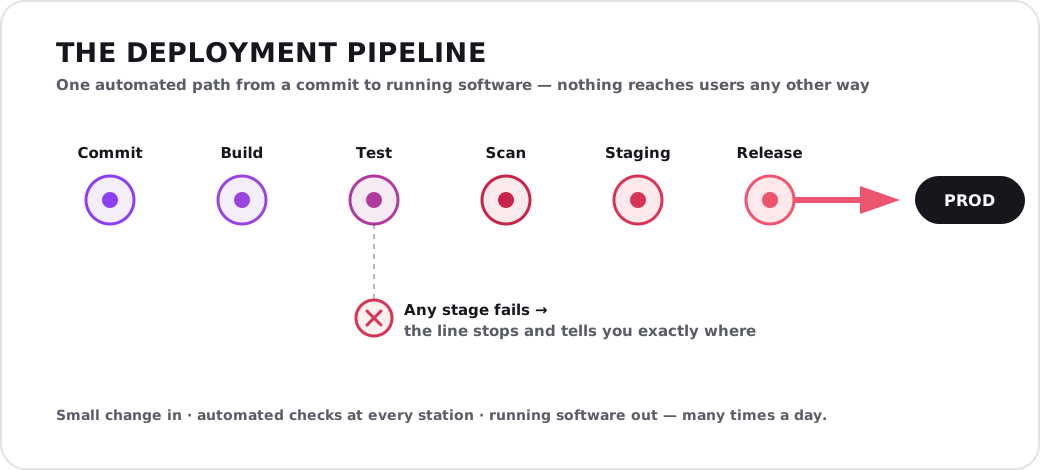
The pipeline is the single path to production: every change passes the same automated stations, and a failure anywhere halts the line instead of reaching users.
The stages are consistent across almost every team, even if the tools differ:
| Stage | What happens | What it protects against |
|---|---|---|
| Commit | A developer pushes a small change to the shared repository | Big-bang, hard-to-review changes |
| Build | The pipeline compiles the code and assembles the artifact | “It works on my machine” surprises |
| Test | Automated tests run — unit, integration, and more | Regressions and broken behavior |
| Scan | Security and quality checks inspect the code and dependencies | Known vulnerabilities and risky code |
| Deploy to staging | The artifact ships to a production-like environment | Environment-specific breakage |
| Release | The change goes to production — on a button or automatically | Manual, error-prone deployments |
The golden rule is that the pipeline is the single path to production. Nothing reaches users except by passing through it. The moment someone can log into a server and “just fix it quickly” by hand, the pipeline’s guarantees evaporate and you are back to hoping rather than knowing.
Why it pays off: the business case
CI/CD can sound like an internal engineering concern, but its effects land squarely on the business: how fast you can respond to the market, how reliable your product feels, and how much of your team’s time goes to building value versus firefighting.
The clearest lens is the cost of a defect — specifically, when it is caught. A bug found the moment a developer commits is trivial to fix; the author is right there, the change is small, and nothing is at stake yet. The same bug found in production is dramatically more expensive: it has to be diagnosed under pressure, it may have already affected customers, and the fix carries its own risk. A good pipeline’s entire job is to shift that discovery as far left — as early — as possible.
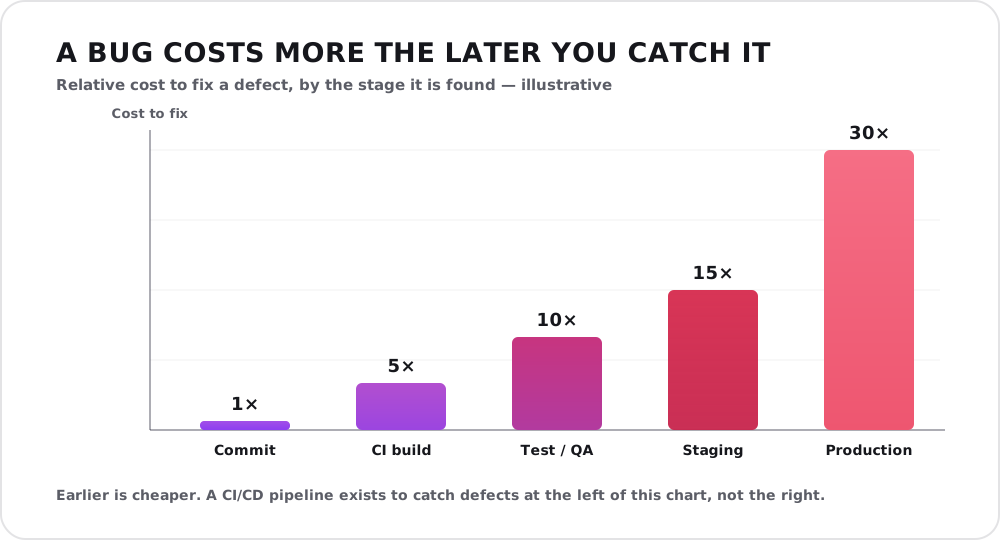
Illustrative figures, but the shape is the point: a defect caught at commit is cheap; the same defect caught in production is dramatically more expensive. A pipeline’s job is to push that discovery leftward.
The research backs this up. The industry-standard DORA studies of software delivery consistently find that teams with mature CI/CD — the “elite” performers — deploy on demand, many times a day, recover from incidents in under an hour, and do all of this while having lower change-failure rates than slower teams. Speed and stability are not a trade-off; done well, the same practices deliver both.
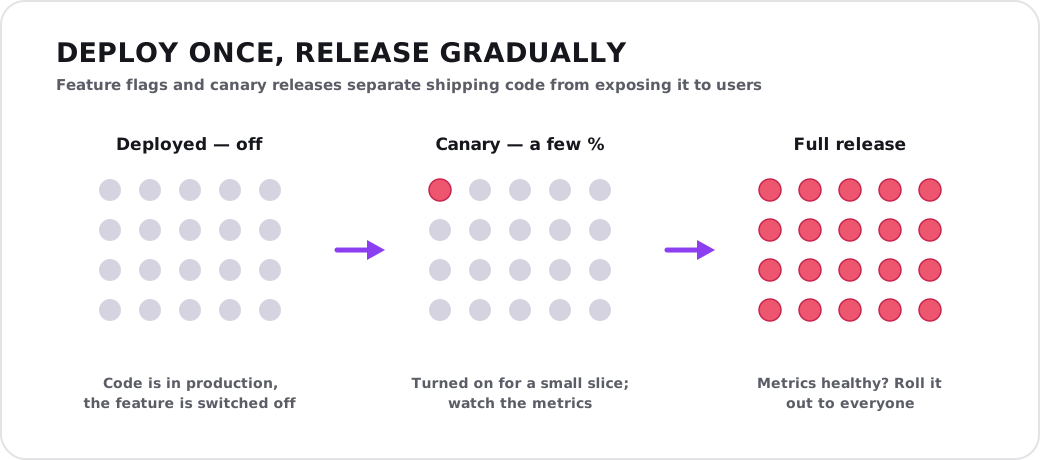
Feature flags and canary releases let you deploy code without immediately exposing it — switch a change on for a few users first, confirm the metrics hold, then roll it out to everyone.
For a business, that translates into concrete advantages:
- Faster time to market. A feature or fix can reach customers the same day it is ready, not at the next scheduled release weeks out.
- Lower risk per release. Small, frequent changes are easy to review, easy to test, and easy to roll back. A big quarterly release bundles dozens of changes into one terrifying event.
- Faster recovery. When something does break, a healthy pipeline lets you ship a fix — or roll back — in minutes.
- A happier, more productive team. Automating the tedious, nerve-wracking parts of releasing frees skilled engineers to build, and quietly reduces the technical debt that manual, shortcut-driven releases tend to accumulate.
Manual releases vs a CI/CD pipeline
The contrast between the old way and the pipeline is stark once you lay it out:
| Dimension | Manual “big-bang” release | CI/CD pipeline |
|---|---|---|
| Release frequency | Weekly, monthly, or rarer | On demand — many times a day |
| Batch size | Large — many changes at once | Small — one change at a time |
| Risk per release | High — lots of surprises bundled | Low — isolated, reversible changes |
| Feedback speed | Days to weeks | Minutes |
| Recovery from failure | Slow, manual, stressful | Fast — redeploy or roll back |
| Who can release | A few experts, carefully | Anyone, safely |
| Team experience | Dread and late nights | Routine and boring |
The practices that make it work
Buying a CI/CD tool is the easy part. A pipeline only delivers its promise when the way the team works supports it. The practices below are what turn automation into real speed and safety.
- Work in small batches. The single biggest lever. Small changes are easier to review, test, and reverse, and they make every other practice work better. Large changes undo the benefits no matter how good your tooling is.
- Integrate frequently (trunk-based development). Merge to the shared main branch often rather than nursing long-lived branches for weeks. The longer a branch lives apart, the more painful its eventual reunion.
- Automate the tests — and trust them. A pipeline is only as trustworthy as its tests. A fast, reliable suite is what lets you deploy without a manual QA gate. A flaky suite that cries wolf is almost worse than none, because the team learns to ignore it.
- Keep main always releasable. If main is broken, the whole team is blocked. Treat a red pipeline as the top priority to fix — never build on top of a broken base.
- Use feature flags. Separate deploying code from releasing a feature. Flags let you ship unfinished or risky work to production turned off, then switch it on for a few users, then everyone — decoupling deployment risk from release decisions.
- Release gradually. Progressive techniques — canary releases, blue-green deployments — expose a new version to a small slice of traffic first and roll it out only if the metrics stay healthy, so a bad change hurts a few users, not all of them.
- Monitor, and automate rollback. Deployment is not “done” until you can see it is behaving. Good monitoring plus an automatic rollback on failure is what makes frequent deploys safe rather than reckless.
Common mistakes
The pattern in most CI/CD disappointments is the same: the tooling arrives but the habits do not change.
- A pipeline with weak tests. Automation that deploys untested code just ships bugs faster. The tests are the point.
- Still batching big releases. Running changes through a pipeline but only once a month keeps all the risk of big-bang releases and adds none of CI/CD’s benefit.
- Manual steps sneaking back in. Every “quick manual fix” straight to a server quietly re-breaks the guarantee that the pipeline is the only path to production.
- Treating it as a one-time setup. A pipeline is living infrastructure. As the system grows — especially across a microservices architecture or a cloud migration — the pipeline has to evolve with it.
Where to start
You do not need an elite pipeline on day one; you need a first version and a direction. A sensible path: get every change building and running an automated test on merge (CI first), then automate deployment to a staging environment, then to production behind a button, and only then — once the tests and monitoring have earned your trust — consider removing the button. Each step is useful on its own, and each one makes the next one safer.
The goal is not to collect buzzwords. It is to make releasing software a non-event: something you do calmly, often, and without fear, so your team spends its energy on building the product rather than on surviving the act of shipping it.
If your releases still feel like high-stakes events — or you are not sure where to begin building a pipeline that fits your system — that is exactly the kind of problem we like to solve with our clients. Reach out for a free consultation and we will help you map a path from manual releases to calm, continuous delivery.