
Cloud Migration Strategy: How to Move Your Business to the Cloud Without Breaking It
A practical guide to migrating to the cloud — the discovery step, the 6 Rs of migration, a phased approach, the pitfalls that blow up budgets, and how to choose the right path per application.
- IT Consulting
- Cloud
- Cloud Migration
- Strategy

Once you have decided the cloud is where your next system belongs — a call we unpack in cloud vs on-premise — a harder question arrives: how do you actually get there without downtime, a runaway bill, or a half-migrated mess that is worse than where you started?
Migrating to the cloud is not a copy-paste job. Done well, it lowers cost, improves resilience, and frees your team to build instead of babysit servers. Done as an afterthought, it drags legacy problems into a more expensive place to run them. This guide lays out a migration strategy that works: what to do before you move anything, the six ways to move an application, a phased plan, the traps that quietly wreck budgets, and how to pick the right approach for each system you own.
The lift-and-shift trap
The most common way a migration goes wrong is deceptively simple: the team treats “move to the cloud” as one big task and copies everything across as-is. This is called lift-and-shift, and for some workloads it is exactly right. As a default for everything, it is a trap.
Cloud infrastructure is priced and designed differently from a server room. An application that ran fine on an over-provisioned on-premise box can rack up surprising bills in the cloud, because now you pay for every idle hour and every gigabyte that leaves the network. Worse, lift-and-shift moves your inefficiencies with you: the brittle dependencies, the manual deploys, the one server nobody dares reboot. You end up paying cloud prices for on-premise problems.
The fix is not to refactor everything — that is the opposite mistake, and it is slow and expensive. The fix is to decide, per application, how much to change on the way over. That is what a migration strategy is for.
You can’t migrate what you can’t see
Before a single workload moves, you need an honest inventory. Most organizations are surprised by how much they are actually running — forgotten services, a database two other systems quietly depend on, an integration that only one person understands.
Discovery has two parts. First, a portfolio inventory: every application, its business value, its age, its running cost, and who owns it. Second, and more often skipped, dependency mapping: what talks to what. Migrate an app without knowing that a nightly job in another system reads its database, and you will find out the hard way — in production, at 2 a.m.
This assessment is where the whole plan is really decided. It tells you what to retire before you waste effort moving it, what can move as-is, and what needs reshaping first. Skipping it is the single biggest predictor of a migration that runs over budget and past its deadline.
The 6 Rs: six ways to move an application
There is no one way to migrate. The industry settled on six, often called the 6 Rs. Each is a different trade-off between effort now and payoff later, and a real migration uses several of them across its portfolio.
| Strategy | What it means | Effort | Best for |
|---|---|---|---|
| Rehost | Lift-and-shift the app as-is onto cloud servers | Low | Stable, low-priority apps you want off your own hardware fast |
| Replatform | Move it, but swap parts for managed services (e.g. a self-run database for a managed one) | Medium | Apps that gain a lot from less operational work, without a rewrite |
| Repurchase | Drop the app and adopt a SaaS product instead | Low–Medium | Commodity functions (email, CRM, HR) where an off-the-shelf tool wins |
| Refactor | Re-architect the app to be cloud-native | High | Strategic, high-value systems where scale or speed is a real advantage |
| Retain | Leave it where it is, for now | None | Apps not ready to move — compliance, cost, or timing reasons |
| Retire | Turn it off entirely | None | Redundant or unused systems discovery reveals |
Two of these — retain and retire — are easy to forget because they involve not migrating. They are often the highest-return decisions you make: every app you switch off is one you never pay to move, secure, or run again.
Read these R’s as the cloud-migration lens: they decide how each workload gets to the cloud, not how you rework the code once it is there. That second question — how to modernize aging software itself — is a complementary one we cover in legacy system modernization. A migration and a modernization often run side by side, but they are different decisions and worth keeping separate.
The everyday sweet spot is replatform. Rehosting a database gets it off your hardware but leaves you running it; swapping in a managed database typically cuts operational effort and cost meaningfully for a modest amount of work — far less than a full refactor. A common winning pattern is to rehost the application servers and replatform the database underneath them, capturing most of the relief for a fraction of the effort.
How a real portfolio actually splits
Because every application gets its own answer, a mature migration is a mix, not a single strategy. The proportions vary by organization, but the shape is consistent: most apps are rehosted or replatformed, a meaningful slice is retired, and only the genuinely strategic systems justify a full refactor.
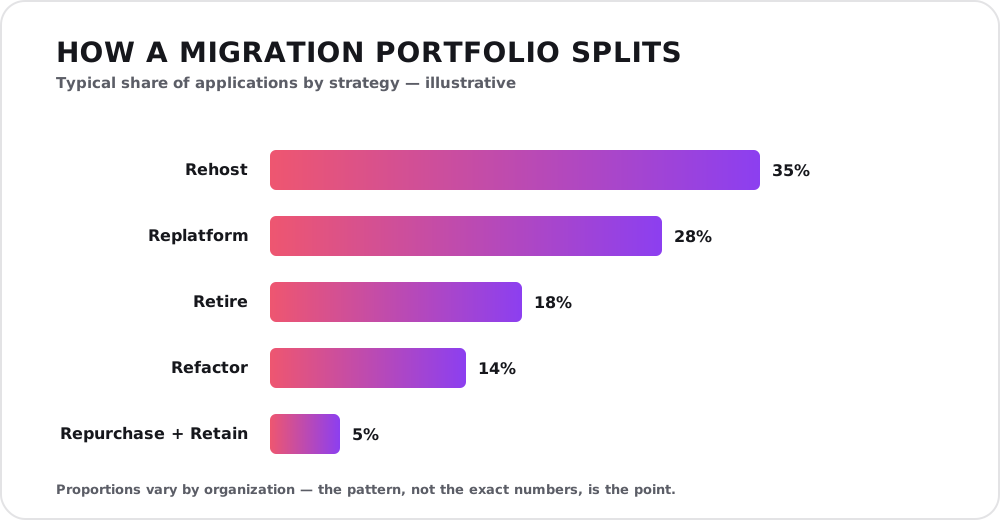
A typical portfolio leans on rehost and replatform, quietly retires a meaningful slice, and reserves the costly refactor for the few systems that earn it. Proportions vary — the shape is the point.
The reason refactoring stays a small slice is economics. Re-architecting is the most expensive path by far, so you reserve it for the handful of systems where being cloud-native is a real competitive edge. Rehost and replatform do the bulk of the work; retire quietly saves money on everything you stop running.
A phased approach beats a big-bang
Almost nobody should migrate everything at once. A big-bang cutover concentrates every risk into a single weekend. A phased migration spreads it out and lets you learn as you go, moving in waves from low-risk to business-critical.

A good migration climbs to the cloud in ordered steps — one manageable wave at a time — not in a single leap.
A dependable sequence runs in four phases:
- Assess — inventory the portfolio, map dependencies, and assign each app a strategy (its R).
- Plan — design the target architecture, set a landing zone with security and networking baked in, and sequence the waves so dependencies move together.
- Migrate — move a wave, test it thoroughly, and cut over with a rollback plan ready. Data usually moves via replication so the switch is fast and low-downtime.
- Optimize — once live, right-size resources, tune costs, and harden security. This is where the cloud’s real savings are earned.
Start with a low-stakes application as a pilot. It surfaces the surprises — an overlooked dependency, a permissions gap, a cost you did not model — while the blast radius is small, and it gives the team a repeatable playbook for the harder waves.
Where migrations go wrong
Even with a plan, a few pitfalls recur often enough to name:
- Cost surprises. Pay-as-you-go bills climb with usage, and data egress — the charge to move data out — is routinely underestimated. Model the real running cost before you commit, not after the first invoice.
- Downtime during cutover. Without replication and a rollback plan, the switch becomes a high-stakes gamble. Rehearse it on a non-critical wave first.
- Security assumptions. The cloud’s shared-responsibility model means the provider secures the infrastructure, but your configuration — access, encryption, network rules — is yours to get right. Misconfigured storage is a classic breach. The same security baseline you apply everywhere still applies here.
- Treating every app the same. Lift-and-shifting everything, or refactoring everything, both waste money. The whole point of the 6 Rs is that different apps deserve different answers.
- Declaring victory too early. The migration is not done when the app is running in the cloud. It is done when it is optimized, secured, and cheaper to operate than what it replaced.
After the cutover: the work isn’t over
A workload that has just been lifted into the cloud is usually running on more capacity than it needs, priced at on-demand rates, with security still set to defaults. The savings the cloud promises are not automatic — they are earned in the optimize phase.
That means right-sizing (matching resources to real usage), using reservations or savings plans for steady workloads, cleaning up idle resources, and putting basic cost monitoring in place so a runaway service is caught in days, not at month-end. This ongoing discipline — often called FinOps — is what separates a migration that saves money from one that quietly costs more than the servers it replaced. It pairs naturally with paying down the technical debt you chose not to fix on the way over.
How to choose your approach
For each application, walk a short decision:
- Is it still needed? No → retire. This is the cheapest win available.
- Is there a good SaaS product for it? Yes, and it is not a differentiator → repurchase.
- Is it strategic, and does scale or speed give you an edge? Yes → refactor, and budget for it honestly.
- Would a managed service remove real operational pain? Yes → replatform — usually the best effort-to-payoff ratio.
- Is it stable, low-priority, and just needs off your hardware? → rehost, and optimize later.
- Is it blocked by compliance, cost, or timing? → retain, and revisit next cycle.
Run this across the portfolio and the strategy writes itself: a prioritized wave plan where each app has an owner, an approach, and a place in the sequence. If your team is thin on cloud experience, this is exactly the point where bringing in an IT consultant early pays for itself — the costly mistakes happen in the plan, not the execution.
Conclusion
A cloud migration is not one big move; it is a portfolio of small, deliberate decisions. The organizations that migrate well do the unglamorous work first — a real inventory, honest dependency mapping, a strategy per application — then move in waves, and treat the cloud bill as something to optimize, not just pay. The 6 Rs give you a vocabulary for those decisions; a phased plan keeps the risk small; and a discipline of optimizing after cutover is what turns “we moved to the cloud” into “the cloud made us faster and cheaper.”
If you are weighing a move and want a second opinion on the strategy — which apps to rehost, which to replatform, which to leave alone, and what it will really cost — that is exactly the kind of planning we do. Reach out for a free consultation.